Omen Universe
All your AI agents, on one living map.
Omen Universe turns the AI work already on your computer into one continuous world. It reads what Codex, Claude Code and Cursor have saved on your machine, then gives every project an island and every conversation a worker you can watch — walking while work moves, waving when it needs you. Find the agent that is stuck, answer the question holding it up, and let the rest carry on. It never starts work on its own.
Desktop · launching soon
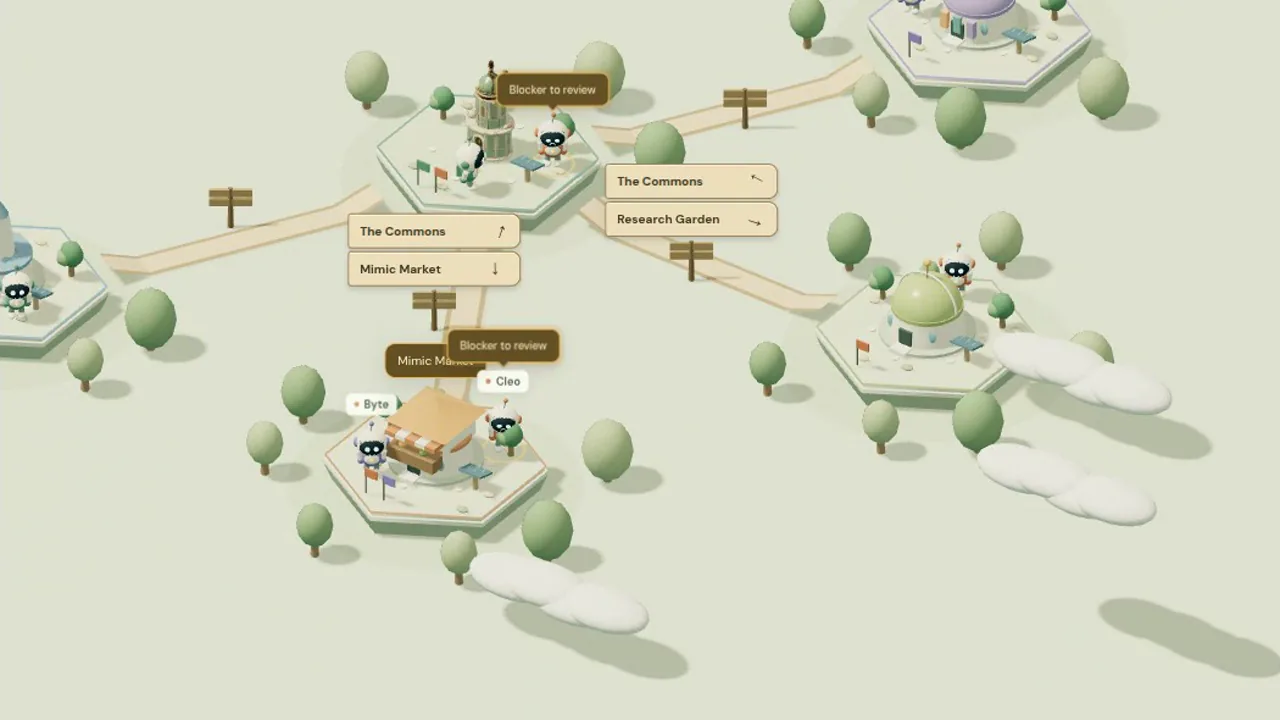
See Omen Universe in action
Captured from the app itself.
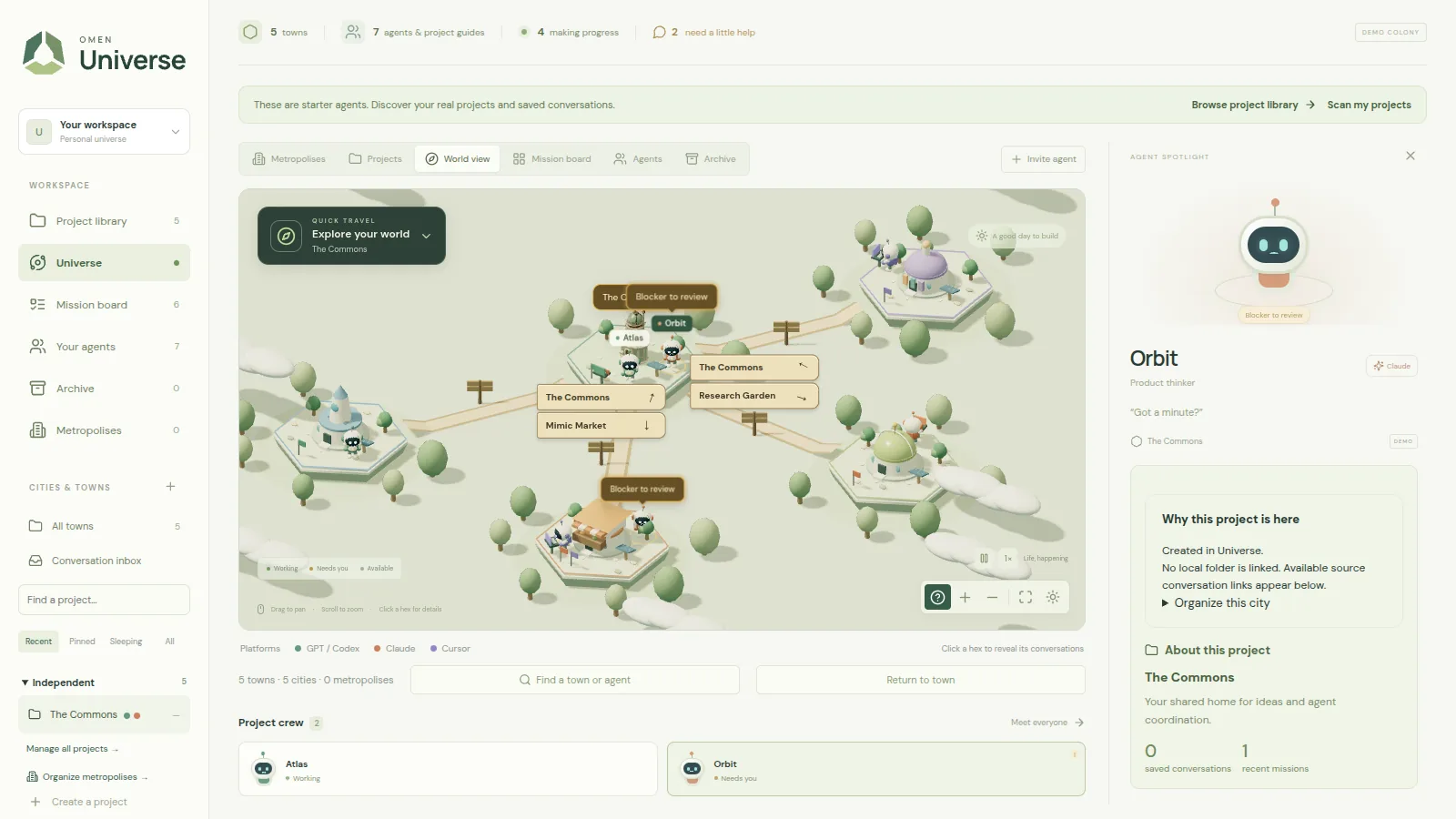
Every project is an island. The spotlight shows who is working, who is stuck and why.
What Omen Universe does
One continuous world
Every project gets a hexagon and a permanent place on one map. Pan, zoom, or fly straight to a project — roads and signposts connect the ones that belong together.
Workers you can read at a glance
Each conversation is a character. Working agents walk and type, blocked ones turn and wave, finished ones stand ready. Status you can catch from across the room.
A queue for what needs you
Questions, approvals, failed runs and quiet stalls collect in one list. Pick one and the camera flies you straight to it.
It finds the work itself
Point it at your machine and it indexes what Codex, Claude Code and Cursor have already saved there — projects, folders, recent conversations — without opening a single session.
Missions that outlive the chat
Record the goal and the next step, link the conversations working on it, and pull open to-dos straight out of a project's own checklists.
The same world on your phone
Pair a phone and carry the whole 3D world with you — same map, same queue — so a one-word answer does not have to wait until you are back at your desk.
How a day in Universe goes
- 1
Find your projects
Universe indexes the AI projects and conversations already saved on your computer.
- 2
Lay out the world
Group related projects into cities and metropolises, file loose conversations, archive what is done.
- 3
See it move
Workers animate from real session signals, so the world matches what is actually happening.
- 4
Unblock it
The queue flies you to whoever is waiting. You reply in the tool that asked, and the request clears.
What is actually in it
Universe is a view of real work, so every part of it is built to show you what is true and nothing more. Here is the whole surface.
What it reads
Universe watches the agent work already on your machine. Here is exactly which tools that means.
Codex
Desktop and CLI alike: the local thread index and its session events — new turns, tool use, the questions and approvals it raises, and how a run ended. Recently updated threads are picked up on every poll.
Claude Code
Local project transcripts, with new sessions noticed about every ten seconds. User turns, assistant and tool activity, the questions it asks you, and the reason it stopped.
Cursor
The editor's own local conversation records, including run status and blocking-action detail. An optional per-folder hook can bind one workspace to one worker for sharper attribution.
ChatGPT
A dated snapshot of your connected-app history: named cloud projects, their conversations and recent excerpts. A snapshot by design, not a live cloud sync.
Not connected yet
Claude's desktop and web Projects need a connector or an export that does not exist yet, so Universe does not pretend to cover them. Work that lives only in the cloud, with nothing saved locally, stays invisible.
The world
One map that holds every project you have, and stays readable as it grows.
Islands and villages
Every project takes a hexagon and keeps it. Related projects share a clearing, joined by roads and wooden crossroads signs that point to their neighbours.
Metropolises
Name a region, drag cities into it, and give it a colour. Grouping changes the map — never who owns a conversation or a mission.
Quick Travel
Search any metropolis and fly there, or hop between them with the arrows. Attention badges tell you which ones need you before you arrive.
Overview and back again
Show whole world fits everything on screen; clicking any hexagon drops you back in, and Return to island recentres after you have panned away.
Sleep and archive
Send a project or a single worker to sleep, or archive it out of sight. Everything is reversible, with bulk clean-up for whatever has been quiet for 30 or 90 days.
Smooth as it grows
Nearby islands render in full detail with animated workers while distant ones simplify, so the whole world stays reachable without building every character at once.
Live activity
Movement in the world is driven by real session signals, or it does not happen.
Refreshed every three seconds
Once your projects are in, the desktop checks local activity every three seconds. No launch wrapper, no per-project setup, no change to how you work.
Animation you can trust
Workers only move when something real says so. Saved history wanders and looks around; it never pretends to be a running job.
Stalls, named as guesses
An active run with no update for five minutes is marked a possible stall — labelled as an inference, because a long tool call looks the same from outside.
Honest failures
If a source cannot be read, or the connection restarts mid-run, the worker tells you it needs checking instead of quietly carrying on.
Colour-coded platforms
Characters, flags, sidebar dots and the legend all share one colour per platform, so a mixed project reads correctly at a glance.
Needs your attention
The point of the whole thing: find the one decision that is holding everything up.
One queue, everything in it
Questions, approvals, run failures and stalls gather in a single list, each with its project, platform and conversation attached.
Focus new requests
A newly detected request flies the camera to it once. It waits while a dialog is open, while you are typing or dragging, and while you are still reviewing something else.
Cues you cannot miss
Agents wave under an amber bubble and halo; a sleeping hut reads Needs you without waking up. Reduced-motion settings quiet the extra movement.
Answered where it was asked
You reply in the tool that asked. A matching answer there clears the request here — and a request stays open until one arrives.
Quiet by default
Blockers live in the world rather than interrupting you. Sound is opt-in, and reconnecting never replays notifications you have already seen.
Projects, conversations, missions
The filing layer underneath the world, built so your corrections always win.
Scan my projects
Search by project name, folder path, or the title of the last conversation, and filter by source. Open one for its workspace path, past missions and results.
The conversation inbox
Loose and unassigned conversations land in one inbox. File them with a click; the original record, its grouping and its deep link stay exactly as they were.
Filing that sticks
Every automatic placement records why it was made, and you can send it back. Your corrections survive rescans and restarts — nothing silently re-files them.
AI help for the hard ones
For conversations the local matcher cannot place, an installed Codex or Claude CLI can propose a home from project metadata and bounded excerpts. It runs read-only with tools restricted, and it proposes only — it cannot move a record, edit a file, or start work.
Missions
Write down a goal, a next step, and the conversations working on it. Tracking a mission never sends a prompt, starts a run, or invents a progress percentage.
Missions from your own docs
Pull unchecked items out of a project's Markdown checklists, keeping the file, the line and the original excerpt as evidence. Duplicates at the same spot are refused.
Handoff briefs
Generate a brief that carries the original objective and its evidence, then open it as an interactive Codex or Claude Code session with that tool's normal permissions intact. Cursor and ChatGPT get a copy-and-open handoff instead.
Back to the source
Jump from any conversation to where the work actually lives: a Codex thread link, the ChatGPT conversation, the Cursor workspace, or the resume command for a Claude Code session — opened beside Universe, never over it.
Desktop and phone
One install on your machine, and an optional companion in your pocket.
One app, nothing to assemble
Install and open it. No runtime to fetch, no terminal, no checkout. Close the window and observation keeps running from the tray or menu bar.
Pairing that expires
Scan a one-use code that dies after fifteen minutes. Phone sessions last a week, live encrypted in your operating system's credential store, and can be revoked from the desktop.
The full world, not a cut-down list
The phone renders the same 3D world, the same characters and metropolises, the same missions and the same attention queue.
Your desktop stays in charge
A paired phone can read your collection and organise it. Scans, integration settings, and launching anything at all stay on the desktop.
No firewall surgery
The desktop opens the connection outward, so there is no inbound rule to add, no router to touch, and no tunnel to keep alive by hand.
Local-first, by design
Universe reads your work. It was built so that is all it ever does.
It stays on your computer
Your history is read from your own machine and the world is saved there too — not in a browser, not in an account, not on a server.
Read-only at the source
Source databases are opened read-only. Universe never edits your history, touches a sign-in, or installs anything inside your repositories.
Bounded and redacted
Transcripts are read in small chunks with common credential shapes stripped out. Reasoning traces, tool arguments and tool output are never copied into the world.
Discovery starts nothing
Finding a project is evidence that it exists, not that anything is running. No saved prompt is ever replayed.
You can switch it off
One setting stops automatic observation entirely, and the world keeps whatever you have already organised.
Where it is today
Universe is about to launch, and we would rather you know exactly what day one includes before you download it.
Public builds at launch
Until the public download is out, builds go to the team only. Signed downloads for macOS and Windows, and automatic updates, arrive with the launch.
One person, one workspace
Every install is its own world. There is no shared team database and no selective project sharing yet.
Your desk is the engine
The phone is a companion to your own computer. While that machine is asleep or offline there is nothing live to report, and the connection can see traffic as it passes through.
Coverage has edges
Locally saved work is what Universe can see, and the formats it reads are unofficial and can change under it. Anything living only in the cloud needs a supplied snapshot.
Omen Universe is almost here
One install, nothing to assemble: no Node, no terminal, no repository checkout. Your history and your world stay on your computer.
The download link goes live on this page at launch.
- macOSApple Silicon and Intel
- WindowsWindows 10 and 11, x64
- Phone companionPairs with your desktop by QR code
Questions about Omen Universe
What is Omen Universe?
A desktop app that turns the AI coding work already on your computer into one world: every project gets an island, and every conversation becomes a worker you can watch.
Which tools does Omen Universe read?
What Codex, Claude Code and Cursor have saved on your machine, plus a dated snapshot of your ChatGPT history. Claude's desktop and web Projects are not covered yet, and work that lives only in the cloud stays invisible.
Does Omen Universe run or change anything?
No. It opens source records read-only, never edits your history, never replays a saved prompt, and keeps your history and your world on your own machine.
Can I use it from my phone?
Yes. Pair a phone with a one-use code and carry the same 3D world, missions and attention queue with you. Scans, settings and launching anything stay on the desktop.
Can I download Omen Universe?
Universe is launching as a desktop app for macOS and Windows, with a phone companion. The download link goes on this page the day public builds are out; join the launch list to get it first.
Ready to try Omen Universe?
All your AI agents, on one living map.
Also on Omen
- Omen ArcadePlay, trade and climb the leaderboard, with one account for every game.Live · Beta
- Omen Game StudioDescribe your idea and build it into a real, playable game.Coming soon
- Omen IDEA code editor with an AI agent that works across your whole project.Coming soon
- The Last FlareAn Astreyn title. Co-op zombie survival for up to 8 players, free in your browser.Play free